

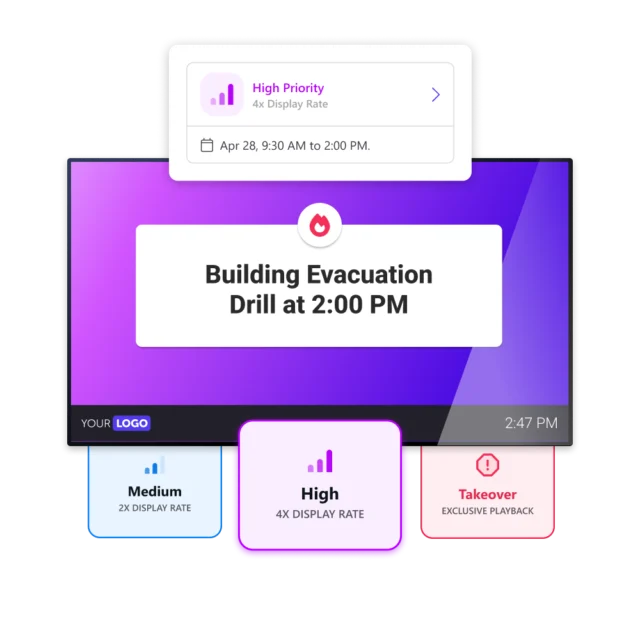
An urgent update is only as effective as the number of people who actually see it. When every message plays by the same rules, a reminder about tomorrow’s mandatory training can get buried between routine posts, with no reliable way to make sure it lands in time. Priority puts that choice in your hands: some messages get a boost, others take over the screen entirely, while everything else keeps running as usual.
Give attention to what matters most
With the Netpresenter Priority feature, you can make sure maintenance notices, upcoming deadlines, reminders, and leadership updates get exactly the attention they deserve. By deciding how often a message appears, or letting it take over the screen entirely, you make sure critical information reaches everyone, not just the people who happen to be looking at the right moment. It gives you full control over visibility without disrupting the rest of your communication, so every important update lands where it counts.



Boost visibility for what genuinely matters
Not every update needs extra attention, but the ones that do shouldn’t compete on equal footing with routine content. Medium priority shows a message twice as often, while High quadruples that rate. This makes it easy to give training deadlines or scheduled maintenance the extra reach they need. Meanwhile, the rest of your content keeps running exactly as before, without any disruption.
Take over every available screen
Sometimes a boost isn’t enough, and a message needs the screen entirely to itself. Takeover pauses the regular rotation on the screens you choose, so only that message plays until you decide otherwise. This is ideal for an important visitor arriving at reception, an urgent leadership announcement, or a safety drill. If two Takeover messages land on the same screen at once, they simply alternate.
Request demo
Discover the power of our platform. We would love to show you everything Netpresenter has to offer during a personalized demo.
Adjust priority whenever needed
Raising a message’s priority never touches its publication schedule, only how often it’s shown while it’s live. Setting a level takes just seconds, and you can adjust it again whenever you need to. You also decide whether the elevated priority stays active until you turn it off, or expires automatically once a deadline passes. This way, important messages get exactly the attention they need, for exactly as long as they need it.
Make sure what matters most doesn’t get lost
Nice-to-know updates shouldn’t compete for attention with the handful of messages that genuinely matter, like an announcement from the CEO. Priority reserves elevated attention for what’s earned it, such as maintenance windows, training deadlines, and leadership updates. It works alongside your existing Alerts rather than replacing them. Alerts stay reserved for genuine emergencies, while Priority handles everything important that isn’t a crisis.
Priority
in a nutshell


Some of our valued customers





Netpresenter blog
Announcing Our New Priority Feature
Some updates simply can’t afford to be missed. We’re rolling out Priority, a new feature that gives you direct control over how much attention any message gets. Choose from four levels right when you publish a message: Normal plays it like any other update, Medium shows it twice as often, High shows it four times as often, and Takeover pauses everything else so that one message has the entire screen to itself.
A Trusted Pioneer in
Employee Communications
For decades, Netpresenter has been pioneering employee communications. Organizations worldwide trust our award-winning platform.







Some questions
already answered
Looking for more information? We’ve collected answers to the most frequently asked questions below. If your question is not listed, feel free to reach out – we’re happy to help!
Can I lower or raise the priority after a message is already published?
Anytime. You can also decide upfront whether the elevated priority should run until you turn it off, or expire automatically after a set period.
How does this relate to Alerts?
Alerts stay exactly as they are, reserved for emergencies. Priority is for the important, planned messages that deserve more reach but aren’t a crisis.
Can too many messages be set to High or Takeover at once?
There’s no hard limit, but it works against you if you push it — the fewer messages at the top, the more each one actually stands out.
What happens if two Takeover messages land on the same screen?
They alternate. Neither one blocks the other; the screen simply switches between them.
Will raising the priority change when my message goes live?
No. Priority never touches the publication schedule — only how often the message is shown once it’s already running.
Does Priority apply to specific screens or audiences?
Yes. Priority is set on the message itself and follows whatever targeting is already in place, so the boost only reaches the screens and groups that message was meant for.