Announcing Our New Priority Feature
Some updates simply can’t afford to be missed. We’re rolling out Priority, a new feature that gives you direct control over how much attention any message gets. Choose from four levels right when you publish a message: Normal plays it like any other update, Medium shows it twice as often, High shows it four times as often, and Takeover pauses everything else so that one message has the entire screen to itself. Scheduled maintenance, upcoming training deadlines, reminders, and leadership updates finally get the visibility they’ve earned, without you having to touch anything else in your content lineup.
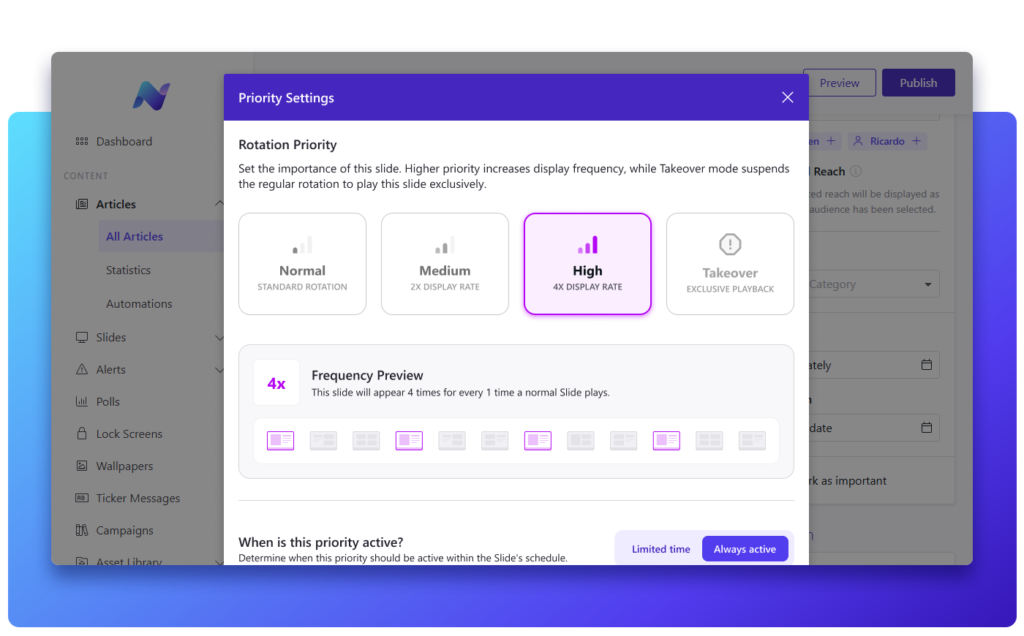
What Priority does for you
Whether you’re managing a single office or communicating across dozens of locations, the same challenge comes up again and again: important messages get buried under everyday content. Priority solves this without adding extra steps to your workflow.
- Boost visibility: show important messages two or four times as often, so they’re impossible to miss.
- Take over screens: pause everything else so an urgent update gets the full screen to itself.
- Stay in control: set a priority level in seconds, adjust it anytime, or let it expire on its own.
- Cut through the noise: make sure a message from the CEO doesn’t get lost among nice-to-know updates.
See it in action
Curious how Priority works? Take a look at the feature page for more information or book a demo to see it for yourself.