NEW: Your Canva content, visible on every screen
Many communication and HR teams are creating their visual content in Canva. That’s no surprise: according to Canva itself, the platform is used by 95% of Fortune 500 companies. But creating great content is one thing. Efficiently making sure employees actually see it is another. Once Canva content needs to appear on screens, it often creates extra work: downloading, uploading, managing versions, and republishing after every change. That’s why we’re introducing the new Canva integration in Netpresenter.
“There is strong demand from customers for a Canva integration. Canva’s strength in content creation combined with Netpresenter’s strength in visual internal communication makes this integration a logical step.”
— Johan Thoolen, Product Owner at Netpresenter

Create in Canva, publish through Netpresenter
With the Netpresenter Canva integration, you can continue creating your content in Canva and display it directly through Netpresenter on Digital Signage and PC screens across your organization. This applies to both static content, such as images, and dynamic content, such as gifs and animations.
This allows you to keep using the design tool you already know, while ensuring your message is seen by everyone.
How it works
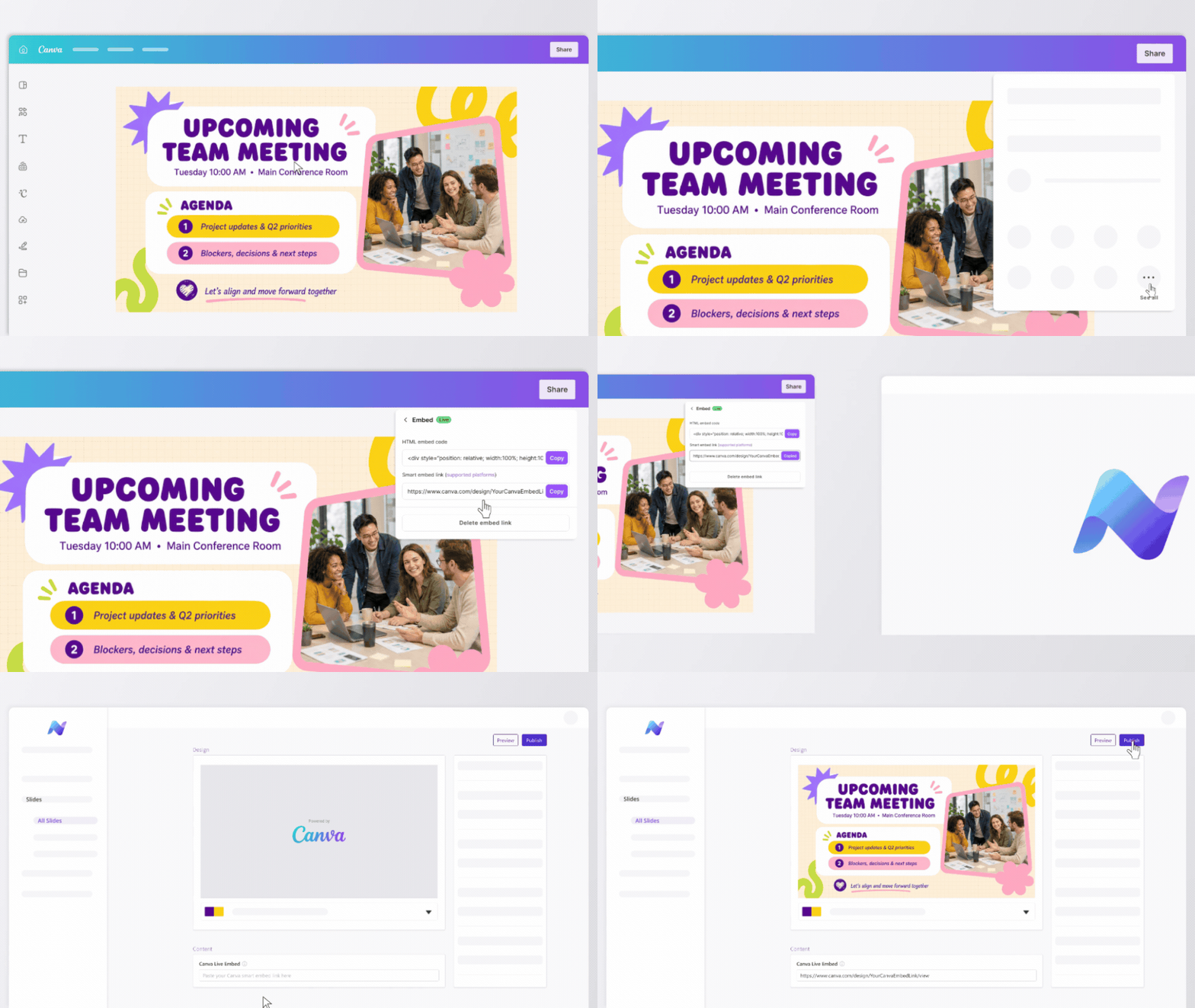
With this integration, you simply add a Canva embed link to the Netpresenter slide that is built for this. Netpresenter automatically loads the content and displays it on the screens you select. If you later update the content in Canva, those changes are automatically reflected in Netpresenter and on all connected screens.
Step by step:
- Create content in Canva.
- Generate the embed link in Canva.
- Create your TV and/or PC slide in Netpresenter.
- Select the Canva system template.
- Paste the Canva embed link into the template.
- Configure the settings and publish the slide.
All other slide settings remain available
The Canva integration works within the existing Netpresenter slide workflow. This means you can use the standard slide settings.
For example:
- Scheduling: determine when your slide is displayed.
- Targeting: show your slide to specific groups of people or devices.
- Footer settings: choose whether to display a logo, ticker, and clock at the bottom of the screen.
The benefits
The Canva integration makes it easier to create and distribute visual content quickly and effectively. You continue creating in Canva, while Netpresenter ensures your content is distributed to the screens employees see every day.
- Less manual work: no need to download and re-upload Canva content separately.
- Always the latest version on your screens: when you update something in Canva, the changes automatically appear through Netpresenter.
- Work with a tool teams already know: communication and HR teams can continue creating in Canva.
Ready to make your Canva content visible?
Already using Canva for internal communication? You can now make your content even easier to display through Netpresenter.
Want to learn more about the Canva integration? Contact us or request a demo.